
Free Deposit Receipt Template
Create professional deposit receipts in under 30 seconds. Download free templates with deposit tracking, remaining balance, PAID stamp, and project details.
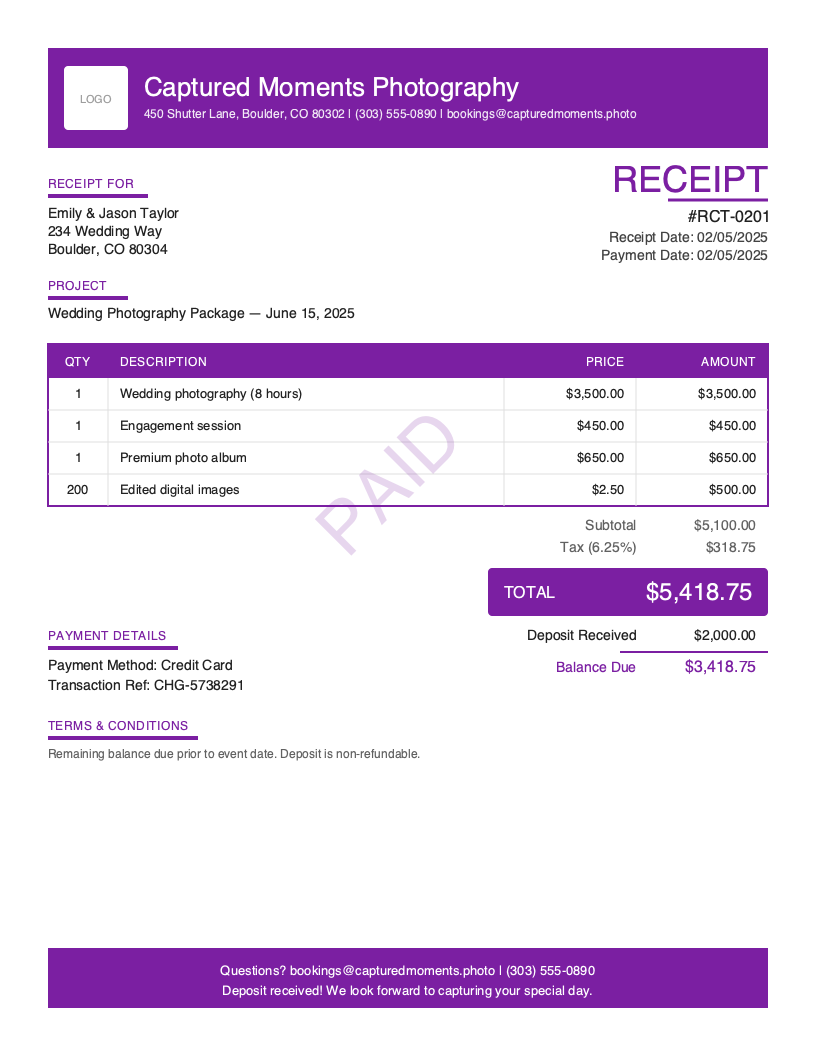
Download Free Deposit Receipt Template
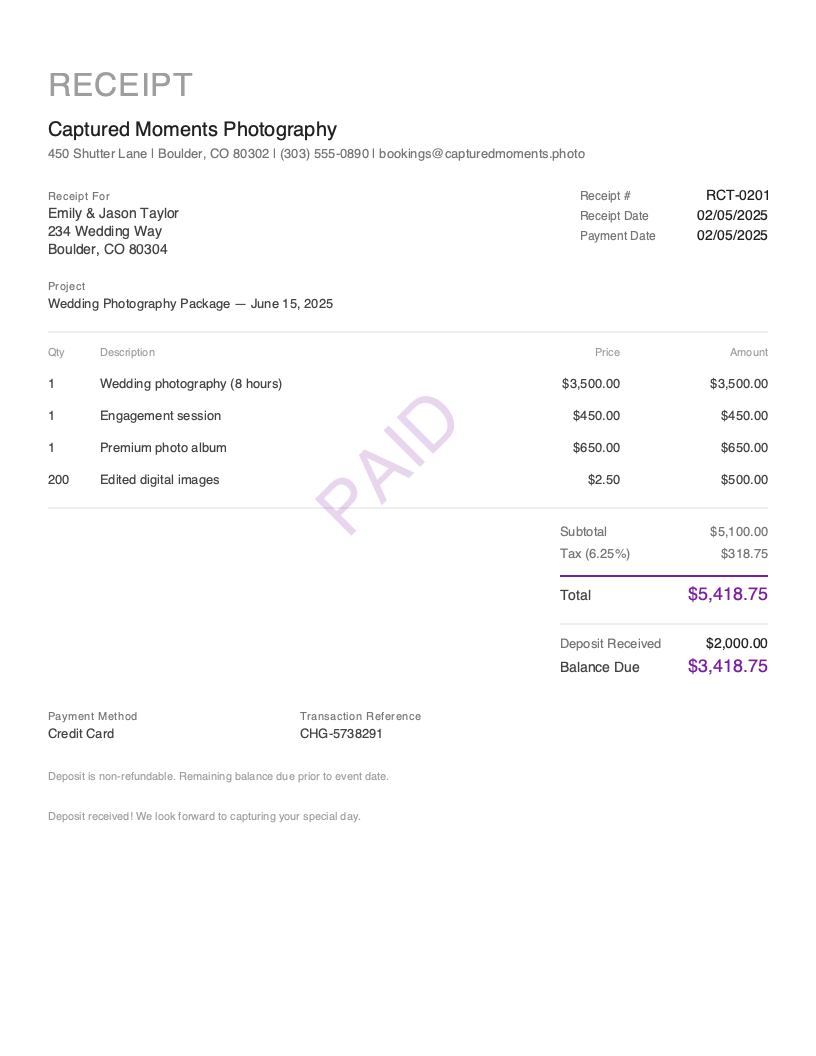
Get Your Free Deposit Receipt Template
Download in your preferred format. Customize with your logo, colors, and business details. Start issuing professional receipts in minutes.
Microsoft Word
Easy to customize, add your logo
Microsoft Excel
Auto-calculate totals and taxes
Most service businesses collect a 50% deposit before starting work — the standard across construction, photography, and events
Time to create and send a professional deposit receipt with automatic balance calculation
Deposit receipts with clear refund terms significantly reduce cancellation and refund disputes
A couple books their wedding photographer nine months in advance. The package totals $5,100 — eight hours of coverage, an engagement session, a premium album, and 200 edited digital images. They pay a $2,000 deposit by credit card to secure the date. Now both sides need a document that confirms the $2,000 was received, itemizes the full package, and clearly shows the $3,100 remaining balance. That document is a deposit receipt.
Deposit receipts are the only receipt type where the balance isn’t zero. Every other receipt — sales, cash, service, contractor — confirms full payment. A deposit receipt confirms partial payment and tracks what’s still owed. This makes the deposit receipt the most financially precise document in the receipt family: it simultaneously serves as proof of payment received, a record of the agreed scope, and a statement of the remaining obligation. Lose this document, and you lose clarity on how much was collected, when, and how much remains.
Here’s the critical distinction: a deposit receipt is not an invoice. An invoice requests payment — “You owe $2,000 as a deposit.” A deposit receipt confirms payment — “$2,000 was received on February 5. Your remaining balance is $3,100.” The deposit receipt always includes a PAID stamp for the amount collected, along with the deposit amount, the project total, and the outstanding balance.
What you’ll find on this page:
- Free downloadable deposit receipt templates (Word & Excel)
- Complete breakdown of required deposit receipt elements
- When and why to use deposit receipts
- Best practices for professional deposit documentation
- How to create deposit receipts in under 30 seconds
Download Free Deposit Receipt Templates
Get started immediately with our professionally designed deposit receipt templates. Both formats include a PAID stamp, deposit tracking section, remaining balance calculation, and project reference fields.
| Format | Best For | Download |
|---|---|---|
| Microsoft Word | Easy customization — add your logo, project details, and deposit terms | Download Word |
| Microsoft Excel | Auto-calculate deposit amount, remaining balance, and tax | Download Excel |
Tip: The Excel template includes built-in formulas that calculate the project total from line items, subtract the deposit amount, and display the remaining balance automatically. Enter your items and deposit — the receipt handles the math.
Both templates include a PAID stamp, deposit-specific pricing summary (deposit paid, remaining balance), project name field, and payment details — the elements that distinguish a deposit receipt from every other receipt type.
Want more polished designs? Create custom receipts with our receipt generator.
What to Include on a Deposit Receipt
A deposit receipt documents two things: the partial payment that was collected and the remaining balance still owed. Unlike a standard sales receipt where the amount paid equals the total, a deposit receipt is the only type where the balance is not $0.00. Both parties need absolute clarity on what was paid, what remains, and what the deposit secures.
Required Receipt Sections
| Section | What to Include | Why It Matters for Deposits |
|---|---|---|
| Receipt Header | Receipt number (RCT-0001), receipt date, document title “RECEIPT” | Creates a traceable record — essential when multiple partial payments will follow |
| Business Information | Company name, address, phone, email | Standard identification for the service provider collecting the deposit |
| Client Information | Client name and billing address | Links the deposit to the specific client for accounting and legal records |
| Line Items | Full scope of products or services being secured | Shows the client exactly what their deposit covers — the complete package, not just the deposit portion |
| Pricing Summary | Subtotal, tax, total, deposit paid, remaining balance | Deposit-specific — the only receipt type where balance ≠ $0.00; must show the math clearly |
| Deposit Balance | Deposit amount, amount paid, remaining balance owed | Deposit-specific — the defining section; tracks partial payment against the project total |
| Project Info | Project name and description | Deposit-specific — identifies what the deposit secures (e.g., “Wedding Photography Package — June 15, 2025”) |
| Payment Details | Payment method used, transaction reference, payment date | Documents how the deposit was paid — credit card confirmations are common for deposits |
| PAID Indicator | Prominent PAID stamp or badge | Confirms the deposit amount was received — even though a balance remains |
| Terms & Conditions | Deposit refund policy, cancellation terms, payment schedule | Critical for deposits — defines what happens if the client cancels or changes scope |
| Thank You Message | Gratitude and next steps reference | Professional close; mention the remaining balance and expected payment timeline |
Critical Deposit Receipt Elements
Deposit Amount and Remaining Balance This is the defining feature of a deposit receipt. Unlike every other receipt type where “Amount Paid” equals “Total,” a deposit receipt shows a partial payment. Display three numbers prominently: the project total, the deposit amount paid, and the remaining balance. For example: Total $5,100, Deposit Paid $2,000, Remaining Balance $3,100. Never leave the client guessing about what they still owe. This clarity prevents disputes months later when the final payment comes due.
Project Name and Scope Every deposit secures something specific — a wedding date, a construction phase, a custom furniture order, an event venue. The project name field ties the deposit to an agreed scope of work or service package. Label it clearly: “Wedding Photography Package — June 15, 2025” or “Kitchen Remodel — Full Project Deposit.” If the scope changes after the deposit, issue an updated receipt or a supplementary document reflecting the revised terms.
Deposit Refund and Cancellation Policy Deposits are the receipt type most likely to generate disputes. Include explicit terms: Is the deposit refundable? Under what conditions? Within what timeframe? What happens if the client cancels? What happens if you cancel? This language belongs in the Terms & Conditions section. A clear policy on the receipt itself — not buried in a separate contract — reduces misunderstandings and protects both parties.
Payment Schedule Reference If the project has multiple payment milestones beyond the initial deposit, reference the schedule on the receipt. “Payment Schedule: 50% deposit (this receipt), 25% at midpoint, 25% at completion.” This sets expectations from the first transaction and gives the client a roadmap for remaining payments.
Understanding Deposit Receipts
When You Need a Deposit Receipt
Deposit receipts are common across service businesses, custom order businesses, and any scenario where a partial payment secures future work or goods:
Securing a project or booking date. Photographers, wedding planners, event venues, and seasonal contractors collect deposits to hold specific dates. The deposit receipt confirms the reservation and documents the financial commitment.
Starting a construction or renovation project. Contractors collecting a 50% down payment before ordering materials need a receipt that documents the deposit and shows the remaining balance. The homeowner needs this for loan documentation, and the contractor needs it for their project accounting.
Custom orders and manufacturing. Furniture makers, custom clothiers, sign companies, and any business producing made-to-order goods collect deposits before starting production. The receipt documents the order specifications and the partial payment.
Retainers for professional services. Consultants, attorneys, designers, and agencies collecting retainer deposits need documentation that clearly separates the retainer amount from the total engagement value.
Who Uses Deposit Receipts
Deposit receipts serve two of Pronto Invoice’s core personas. Field service professionals — particularly contractors, remodelers, and trades workers — collect deposits before major projects. A roofer might collect 50% before ordering materials. A general contractor might collect a 30% deposit before beginning demolition. Small business owners — photographers, event planners, custom manufacturers, caterers — collect deposits to reserve dates and begin preparation.
The common thread: any business where the work happens in the future and the client pays upfront to secure the commitment.
Deposit Receipts vs. Invoices
An invoice says: “Your wedding photography package is $5,100. Please pay a $2,000 deposit to secure June 15.” A deposit receipt says: “We received your $2,000 deposit on February 5 for the wedding photography package. Your remaining balance is $3,100.” The invoice creates the obligation. The receipt confirms the obligation was partially fulfilled. If you send the invoice first and collect the deposit later, the system generates the deposit receipt linked to the original invoice. If you collect the deposit in person without a prior invoice, create a standalone deposit receipt.
Financial and Legal Implications
Deposit receipts carry specific legal weight. In many jurisdictions, a deposit creates a contractual obligation on both parties — the client has committed funds, and the service provider has committed to delivery. The receipt documents this mutual commitment. For tax purposes, deposits are generally recognized as income when received (not when the project completes), making accurate deposit documentation essential for bookkeeping. Consult your accountant about deposit income recognition rules for your specific business.
Create Deposit Receipts in Under 30 Seconds
Spreadsheet templates require manual balance calculations. Paper receipt books can’t track remaining balances across projects. When a client hands you a check at a consultation or pays online to secure their booking, you need a receipt that calculates the balance automatically and looks professional enough to frame on the fridge.
Pronto Invoice is built for businesses that collect deposits. Create deposit receipts from your phone in 5 simple steps — with automatic balance tracking.
- Select Client — choose from saved clients or add the new client on the spot
- Add Items — enter the full project scope (photography package, construction phases, custom order details) with pricing
- Payment Info — select how the deposit was paid (credit card, check, cash, Zelle, Venmo) and mark it as a partial payment — the app calculates the remaining balance automatically
- Document Details — receipt number auto-generates; add the project name, deposit terms, and any notes about the payment schedule
- Review & Send — email the receipt or share it on the spot; client sees the deposit paid and the balance remaining
The key difference from invoicing: Step 3 asks “How was this paid?” — not “How can they pay?” And unlike other receipt types, deposit receipts preserve the remaining balance instead of zeroing it out.
Features for Professional Deposit Receipts
- PAID Stamp — every receipt includes a prominent PAID indicator for the deposit amount collected
- Automatic Balance Calculation — enter the deposit amount and the app calculates the remaining balance from the project total
- Offline Capability — create deposit receipts at consultation meetings, job sites, or events without internet. Syncs when you’re back online.
- Project Tracking — label deposits by project name for easy tracking across multi-payment engagements
- Photo Attachments — attach up to 4 reference photos (project site, product mockups, design concepts)
- Multiple Payment Methods — track deposits paid by credit card, check, cash, Zelle, Venmo, PayPal, ACH transfer, and more
- Auto-Receipt on Payment — if you invoiced first and record a partial payment, the deposit receipt auto-generates with balance tracking
- Invoice-to-Receipt — convert any partially paid invoice to a deposit receipt with one tap
Create Your First Deposit Receipt Free →
Related Receipt Templates
Looking for other receipt types? Browse our complete collection:
- Contractor Receipt Template — construction project receipts with labor/materials breakdown
- Service Receipt Template — general service work completion receipts
- Payment Receipt Template — invoice payment confirmations
- Freelance Receipt Template — project and hourly rate receipts
- All Receipt Templates
- Photography Invoice Template
- Construction Invoice Template
- All Invoice Templates
Start Creating Professional Deposit Receipts Today
Every deposit deserves documentation — for your bookkeeping, your client’s confidence, and your legal protection. Pronto Invoice creates deposit receipts from your phone in under 30 seconds, automatically calculates remaining balances, works offline at any consultation or job site, and stamps every receipt with a clear PAID indicator.
Create Free Deposit Receipt → | Download the App →
This guide is for informational purposes only and does not constitute legal or tax advice. Consult with a qualified professional for guidance specific to your situation and jurisdiction.
Last updated: March 2026
Deposit Receipt Best Practices
Issue the Receipt Immediately Upon Collecting the Deposit
Regardless of how the deposit arrives — consultation meeting, phone, online payment link, or job site — issue the receipt the same day. Delays create uncertainty about whether the payment was processed and the date reserved.
Show the Math — Deposit, Total, and Remaining Balance
Never issue a deposit receipt that shows only the amount collected. Display all three numbers prominently: what the total project costs, how much they paid, and what remains. This is what separates a deposit receipt from a generic payment receipt.
Use Professional, Branded Templates
Your deposit receipt is often the first financial document a client receives from your business. It sets the tone for the entire engagement. A clean, branded receipt demonstrates the same professionalism you'll bring to the project.
Include Explicit Refund and Cancellation Terms
Deposit disputes are among the most common small business disagreements. Put the terms on the receipt — specificity prevents arguments. The deposit receipt becomes a reference document that both parties agreed to.
Reference the Full Payment Schedule
If the project involves multiple payments beyond the initial deposit, include the complete schedule on the receipt so the client knows exactly when future payments are expected.
Track Deposits Against Projects, Not Just Clients
A single client might have deposits for multiple projects. Label every deposit receipt with the specific project name so deposits are tracked per-project, not just per-client, preventing accounting confusion.
Keep a Copy for Your Records — Every Time
Deposit receipts are financial documents with legal implications. Archive every deposit receipt with the project file. If a client disputes the refund policy, your copy with the terms printed on it is your primary documentation.
Frequently Asked Questions
A professional deposit receipt should include: your business name and contact information; the client's name and billing address; the project name and description; itemized line items showing the full project scope; the pricing summary with subtotal, tax, and total; the deposit amount paid; the remaining balance; the payment method and transaction reference; a PAID stamp; and deposit terms including refund and cancellation policy.
No. An invoice is issued before payment to request money — 'Your deposit of $2,000 is due to secure June 15.' A receipt is issued after payment to confirm money received — '$2,000 deposit received on February 5. Remaining balance: $3,100.' For deposits specifically, the distinction is critical: the invoice creates the obligation to pay, while the receipt proves the payment was made and tracks what's still owed.
Yes. A deposit receipt is the only receipt type where the balance is not zero. A standard sales or service receipt shows 'Amount Paid: $500, Balance: $0.00' — the transaction is closed. A deposit receipt shows 'Deposit Paid: $2,000, Remaining Balance: $3,100' — the transaction is partially complete. It also typically includes a project name, payment schedule reference, and deposit-specific terms.
Deposit refund policies are entirely up to your business and local laws. Common approaches include: non-refundable deposits (common for custom orders and events), partially refundable with a tiered timeline (full refund if cancelled 90+ days out, 50% refund within 30-90 days, non-refundable within 30 days), or fully refundable minus a restocking or administrative fee. Whatever your policy, print it clearly on the deposit receipt.
For projects with multiple payment milestones — 50% deposit, 25% at midpoint, 25% at completion — issue a separate deposit receipt for each partial payment. Label them sequentially: 'Kitchen Remodel — Deposit 1 of 3' and 'Kitchen Remodel — Deposit 2 of 3.' Each receipt should show the cumulative amount paid and the updated remaining balance.
Use a mobile invoicing app like Pronto Invoice. Tap 'New Receipt,' select the deposit receipt type, add the client and project details, enter the full scope as line items, mark the payment as a partial deposit (the app calculates the remaining balance automatically), select the payment method, and send. Takes under 30 seconds and works offline.
In most cases, yes — deposits are recognized as income when received under cash-basis accounting, which is how most small businesses operate. However, some deposits may be treated as trust funds or escrow depending on your industry and jurisdiction. Consult your accountant about the correct tax treatment for deposits in your specific business.
Related Receipt Templates
Start Creating Professional Receipts Today
Create your first receipt in under 30 seconds. Join thousands of professionals who use Pronto Invoice to issue receipts on the spot.
This guide is for informational purposes only and does not constitute legal or tax advice.