
Free Service Receipt Template
Create professional service receipts in under 30 seconds. Download free templates with labor and materials breakdown, PAID stamp, and service location details.
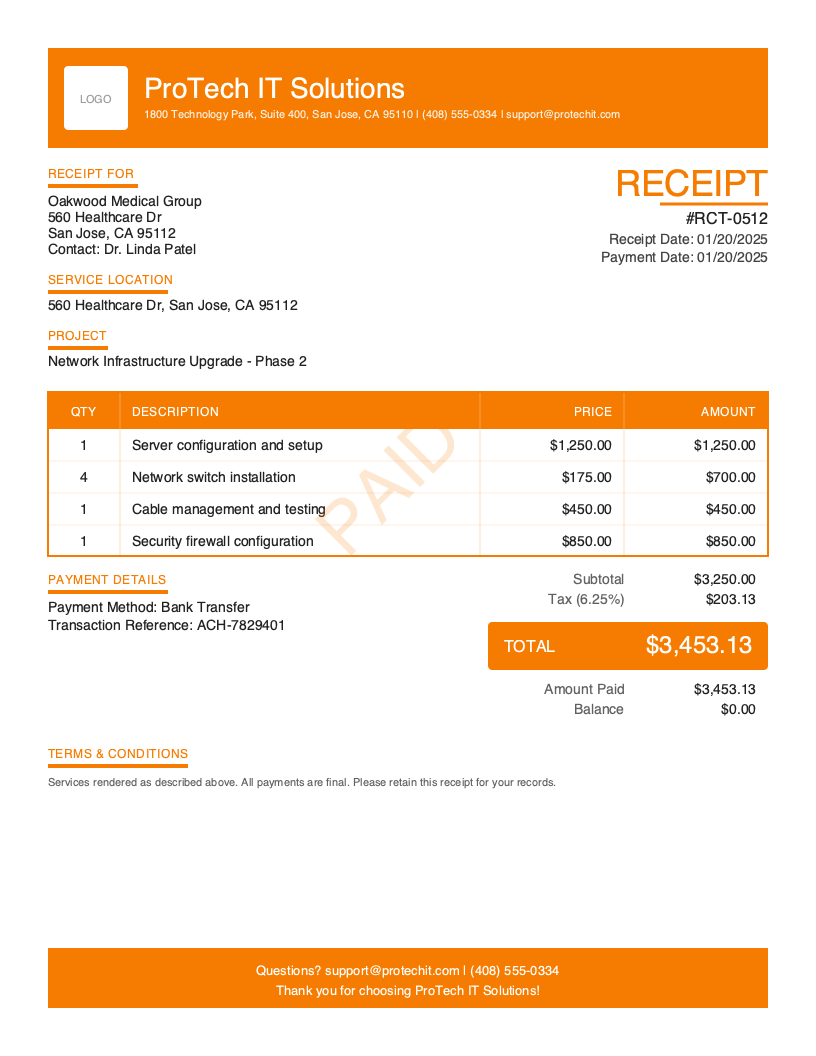
Download Free Service Receipt Template
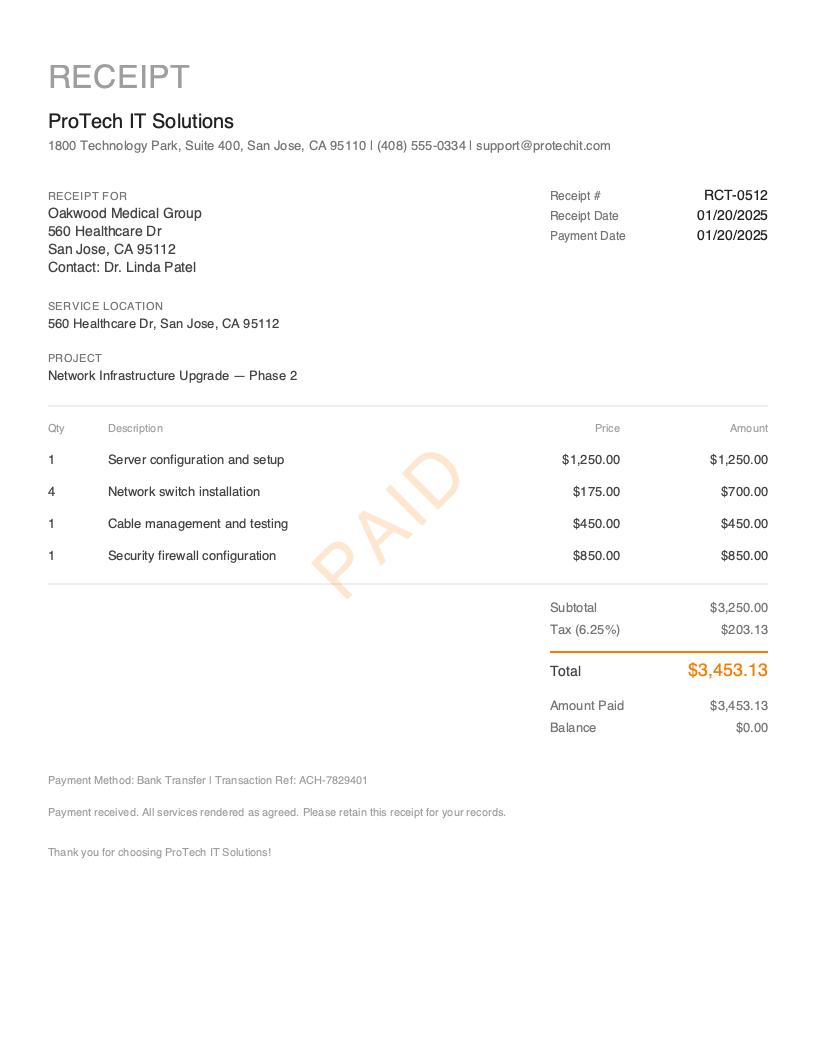
Get Your Free Service Receipt Template
Download in your preferred format. Customize with your logo, colors, and business details. Start issuing professional receipts in minutes.
Microsoft Word
Easy to customize, add your logo
Microsoft Excel
Auto-calculate totals and taxes
Small business owners who perform work at customer locations and need service receipts daily
Typical warranty period documented on service receipts for labor performed
Time to create and send a professional service receipt with Pronto Invoice
You just spent three hours replacing a water heater. The homeowner watches as you tighten the last connection, run the test, and confirm everything works. She asks, “Can I get a receipt for that?” She paid by card on the spot — now she needs documentation showing the labor hours, the parts you installed, and the service location for her home warranty claim.
Service receipts are the standard for any completed repair, maintenance, or professional service work. They go beyond a basic sales receipt by breaking down exactly what was done: labor hours, materials used, the service location, and the project scope. For field service professionals, a detailed service receipt reduces callback disputes by documenting the work performed — not just the payment collected.
The key distinction matters: a service receipt confirms that work was completed and payment was received. It’s not an estimate, not a quote, and not an invoice requesting future payment. It’s proof that the job is done, the customer paid, and both parties have a record. Every service receipt should include a clear PAID stamp, a labor and materials breakdown, and the service location where work was performed.
What you’ll find on this page:
- Free downloadable service receipt templates (Word & Excel)
- Complete breakdown of required service receipt elements
- When and why to use service receipts
- Best practices for professional service documentation
- How to create service receipts from your phone in under 30 seconds
Download Free Service Receipt Templates
Get started immediately with our professionally designed service receipt templates. Both formats include a PAID stamp, labor/materials breakdown structure, and service location field.
| Format | Best For | Download |
|---|---|---|
| Microsoft Word | Easy customization — add your logo, service categories, and business details | Download Word |
| Microsoft Excel | Auto-calculate labor hours × rate, materials totals, and tax | Download Excel |
Tip: The Excel template includes built-in formulas that calculate labor costs (hours × hourly rate), materials subtotals, and the combined total with tax. Enter your rate and hours — the receipt handles the math.
Both templates include a PAID stamp, service location field, and project name — the elements that distinguish a service receipt from a basic sales receipt.
Want more polished designs? Create custom receipts with our receipt generator.
What to Include on a Service Receipt
A service receipt documents two things simultaneously: what work was performed and that payment was received. Unlike a basic sales receipt for a product purchase, a service receipt must capture the details of labor, materials, and the location where service was delivered. Every element should answer the customer’s question: “What exactly did I pay for, and where was it done?”
Required Receipt Sections
| Section | What to Include | Why It Matters for Service |
|---|---|---|
| Receipt Header | Receipt number (RCT-0001), receipt date, document title “RECEIPT” | Creates a traceable record tied to a specific service visit |
| Business Information | Company name, address, phone, email, license number | Identifies the service provider; license number validates credentials |
| Client Information | Customer name and billing address | Links payment to a specific client for accounting and follow-up |
| Service Location | Address where work was performed | Service-specific — often different from billing address; critical for warranty and future service calls |
| Project Name | Job or project description | Service-specific — ties the receipt to a specific scope of work (e.g., “Water Heater Replacement”) |
| Line Items | Labor hours, materials, and service fees with quantities, rates, and amounts | Documents what was done and what it cost — the core of a service receipt |
| Pricing Summary | Subtotal, tax, total, amount paid, balance ($0.00) | Confirms the full amount was collected for the completed service |
| Payment Details | Payment method used, transaction reference, payment date | Creates an auditable trail — essential for matching payments to service visits |
| PAID Indicator | Prominent PAID stamp or badge | Immediately communicates the service is paid in full |
| Terms & Conditions | Warranty terms, service guarantees, callback policy | Protects both parties — documents what happens if the repair fails |
| Thank You Message | Brief gratitude message | Professional touch that encourages repeat service calls |
Critical Service Receipt Elements
Labor and Materials Breakdown The defining feature of a service receipt is the separation of labor from materials. Customers expect to see these as distinct line items — not a single lump sum. List labor with hourly rate and hours worked (e.g., “Plumbing labor — 2.5 hrs @ $95/hr = $237.50”). List each material separately with quantity and unit price (e.g., “50-gal water heater — 1 × $680.00”). This transparency builds trust and helps customers file insurance or warranty claims.
Service Location Service work happens at the customer’s location, which is often different from their billing address. Document the full service address on every receipt. This is critical for warranty records (“We installed the unit at 456 Oak Lane”), future service scheduling, and resolving disputes about where work was performed. For multi-location commercial clients, the service location ties the receipt to a specific property.
Project or Job Name A descriptive project name turns a generic receipt into a meaningful record. Instead of just listing line items, include a project name like “Kitchen Faucet Replacement” or “Network Infrastructure Upgrade — Phase 2.” This helps both you and the customer quickly identify what the receipt covers when searching records months or years later.
Warranty and Service Guarantee Service work often carries warranty obligations — 90 days on labor, one year on parts, manufacturer warranties on equipment. Document these terms directly on the receipt. If the customer calls back about a failed repair, the receipt becomes the reference document for what’s covered and what isn’t. Clear warranty language on the receipt prevents misunderstandings and protects your business.
Understanding Service Receipts
When You Need a Service Receipt
Service receipts apply whenever professional labor is performed and payment is collected. The most common scenarios:
Completed repair work. An HVAC tech replaces a compressor, a plumber clears a drain, an electrician upgrades a panel. The work is done, the customer pays, and they need documentation showing what was repaired, what parts were used, and what it cost.
Maintenance visits. Routine services — furnace tune-ups, pest control treatments, IT system checks — require receipts that document the scope of the maintenance performed. These receipts often feed into maintenance agreement records.
Professional service engagements. IT consultants completing a server migration, cleaning crews finishing a deep clean, pest control technicians completing a treatment. Any scenario where labor was the primary deliverable.
Multi-visit projects. When a larger project spans multiple visits, each visit can generate a service receipt documenting that day’s work and payment. This creates a paper trail for the entire project.
Who Uses Service Receipts
Service receipts map directly to the field service persona — the 40% of small business owners who perform work at customer locations. HVAC technicians, plumbers, electricians, IT support professionals, cleaning crews, pest control operators, and maintenance technicians all issue service receipts daily.
The key difference from a cash receipt is specificity. A cash receipt emphasizes the payment method (cash). A service receipt emphasizes the work performed (labor + materials). A service visit paid in cash would use a service receipt with “Cash” as the payment method — the service detail is what matters most.
Service Receipts vs. Invoices
An invoice says: “Here’s the work we plan to do and what it will cost. Please pay within 30 days.” A service receipt says: “Here’s the work we completed and confirmation that you’ve paid.” If you’re collecting payment immediately after completing service, go straight to a service receipt — you don’t need an invoice as an intermediary. If the customer was invoiced first and pays later, the system generates a payment receipt linked to the original invoice.
Legal and Tax Implications
Service receipts serve as primary documentation for both income reporting and expense deductions. For the service provider, they document earned revenue. For the customer, they document deductible business expenses, home improvement costs, or insurance-reimbursable repairs. Many states require service providers (especially home improvement contractors) to provide written documentation of work performed, including labor rates, materials used, and total cost. A professional service receipt satisfies these requirements.
Create Service Receipts in Under 30 Seconds
Downloadable templates work at a desk, but when you’re crouched in a crawl space or standing in a server room, you need something faster. You need a receipt you can create from your phone before you walk out the door.
Pronto Invoice is built for service professionals who work on-site. Create detailed service receipts from your phone in 5 simple steps — even without internet.
- Select Client — choose from saved clients or add a new one on-site
- Add Items — pick saved services or enter labor hours and materials used
- Payment Info — select the payment method used (one tap — card, cash, check, etc.)
- Document Details — receipt number auto-generates; add project name, service notes, and warranty terms
- Review & Send — hand the customer their receipt or email it instantly
The key difference from invoicing: Step 3 asks “How was this paid?” — not “How can they pay?” You’re documenting a completed transaction, not requesting future payment.
Features for Professional Service Receipts
- PAID Stamp — every receipt includes a prominent PAID indicator, automatically applied
- Offline Capability — create service receipts in basements, crawl spaces, and areas with zero signal. Syncs when you’re back online.
- Labor + Materials Tracking — separate labor hours and materials with automatic total calculations
- Photo Attachments — attach up to 4 before/after photos documenting the completed service
- On-Site Signature — capture the customer’s signature confirming service completion and payment
- Auto-Receipt on Payment — if you invoiced first and record payment later, the receipt auto-generates with all service details pre-filled
- Invoice-to-Receipt — convert any paid service invoice to a receipt with one tap
Create Your First Service Receipt Free →
Related Receipt Templates
Looking for other receipt types? Browse our complete collection:
- Cash Receipt Template — for cash-only transactions on-site
- Contractor Receipt Template — construction and home improvement projects
- Payment Receipt Template — payment confirmations linked to existing invoices
- Sales Receipt Template — general-purpose receipt for any transaction
- All Receipt Templates
- HVAC Invoice Template
- Plumbing Invoice Template
- All Invoice Templates
Start Creating Professional Service Receipts Today
Every completed service call deserves a professional receipt — one that documents the work, confirms the payment, and protects both you and your customer. Pronto Invoice creates detailed service receipts from your phone in under 30 seconds, works offline at any job site, and automatically tracks labor, materials, and payment details.
Create Free Service Receipt → | Download the App →
This guide is for informational purposes only and does not constitute legal or tax advice. Consult with a qualified professional for guidance specific to your situation and jurisdiction.
Last updated: March 2026
Service Receipt Best Practices
Issue the Receipt Immediately After Completing Service
Create the receipt while still at the job site so the customer can review line items while the work is fresh and confirm accuracy.
Break Down Labor and Materials Separately
Never combine labor and materials into a single line item. Customers expect transparency, and it's essential for insurance claims and warranty documentation.
Present a Polished, Professional Receipt
A clean, professionally formatted receipt with your logo and organized line items reflects the quality of your service work and inspires customer confidence.
Always Include the Service Location
Document where the work was performed, even if it matches the billing address. Essential for home sale disclosures, insurance claims, and warranty records.
Document Equipment Serviced
Include make, model, and serial number for any equipment serviced. This creates a service history trail invaluable for future repairs and warranty claims.
Attach Before/After Photos
Photos transform a service receipt into a complete service record, supporting warranty claims and reducing 'you didn't fix it properly' disputes.
Include Warranty Terms on the Receipt
State warranty information directly on the receipt so customers have a single document to reference if issues arise.
Frequently Asked Questions
A professional service receipt should include: your business name, contact info, and license number; the customer's name and billing address; the service location where work was performed; a project or job name; detailed line items separating labor (with hourly rate and hours) from materials (with quantities and unit prices); subtotal, tax, total, and amount paid; the payment method used; a PAID stamp; and warranty or service guarantee terms.
No. An invoice is issued before payment — it requests money and includes due dates and payment terms. A receipt is issued after payment — it confirms money was received. A service receipt specifically documents both the completed work and the payment. If you're collecting payment on-site after finishing a job, create a service receipt directly. If the customer was invoiced and pays later, the system generates a payment receipt linked to the original invoice.
A sales receipt is a general-purpose receipt for any transaction. A service receipt is specialized for labor-based work — it includes service location, project name, and a labor/materials breakdown that a basic sales receipt doesn't require. Use a service receipt whenever professional service work is the primary deliverable, and a sales receipt for straightforward product purchases.
Yes — it's best practice and often required. Customers expect to see what they're paying for labor versus parts. Insurance companies require this separation for reimbursement claims. Many states tax materials but exempt labor (or vice versa), so the breakdown is also important for accurate tax calculation.
Use a mobile invoicing app like Pronto Invoice. Tap 'New Receipt,' select the service receipt type, add your client and service location, enter labor hours and materials, set the payment method, capture a signature if needed, and send. Takes under 30 seconds and works offline — ideal for field service professionals finishing jobs on-site.
Yes, especially for HVAC, plumbing, electrical, and IT service work. Serial numbers tie the receipt to specific equipment, which is essential for warranty claims, future service calls, and equipment replacement planning.
Keep copies of all service receipts for at least three years for general tax purposes. If the receipts relate to property improvements, keep them for the life of the property plus three years — they may affect capital gains calculations when the property is sold. Digital storage through a receipt app ensures you never lose a record.
Related Receipt Templates
Start Creating Professional Receipts Today
Create your first receipt in under 30 seconds. Join thousands of professionals who use Pronto Invoice to issue receipts on the spot.
This guide is for informational purposes only and does not constitute legal or tax advice.